Airport Locker Rental
Directions
- To use the "command prompt":
- 1. [tab] to the input field.
- (you should see a blinking cursor)
- 2. Type in your data
- (Press [Enter] to submit)
- ————————————————————————————
- Note: To go back to the main menu,
- press [tab] until you see a prompt
- at the bottom of the "terminal."
- Click on the Load Console Demo button to test it out!
About
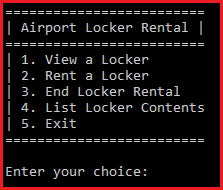
This application is designed to demo my Airport Locker Rental console app.
The UI was designed to mimic the windows command prompt by utilizing HTML and CSS.
It was a fun challenge getting it to imitate the "state" of the console version.
I used ASP.NET Core [MVC] to handle requests, and C# is the language I used.
If you would like to see the GitHub repository, go here.